Triglav, part 1: running a team of AI coding agents with Claude Code, Codex and MCP
Triglav is a local orchestrator that runs AI coding agents on real tickets as a small consultancy. I wrote down the experience I wanted before I wrote any code: I set the objective, a Staff engineer agent handles most of the delivery decisions, and I step in only when it’s necessary. One agent plans, others implement, others review and advise, and a dashboard shows me all of it. This post is the high-level tour. Later parts go deeper into waiting, token cost, and starting processes safely from a web app.
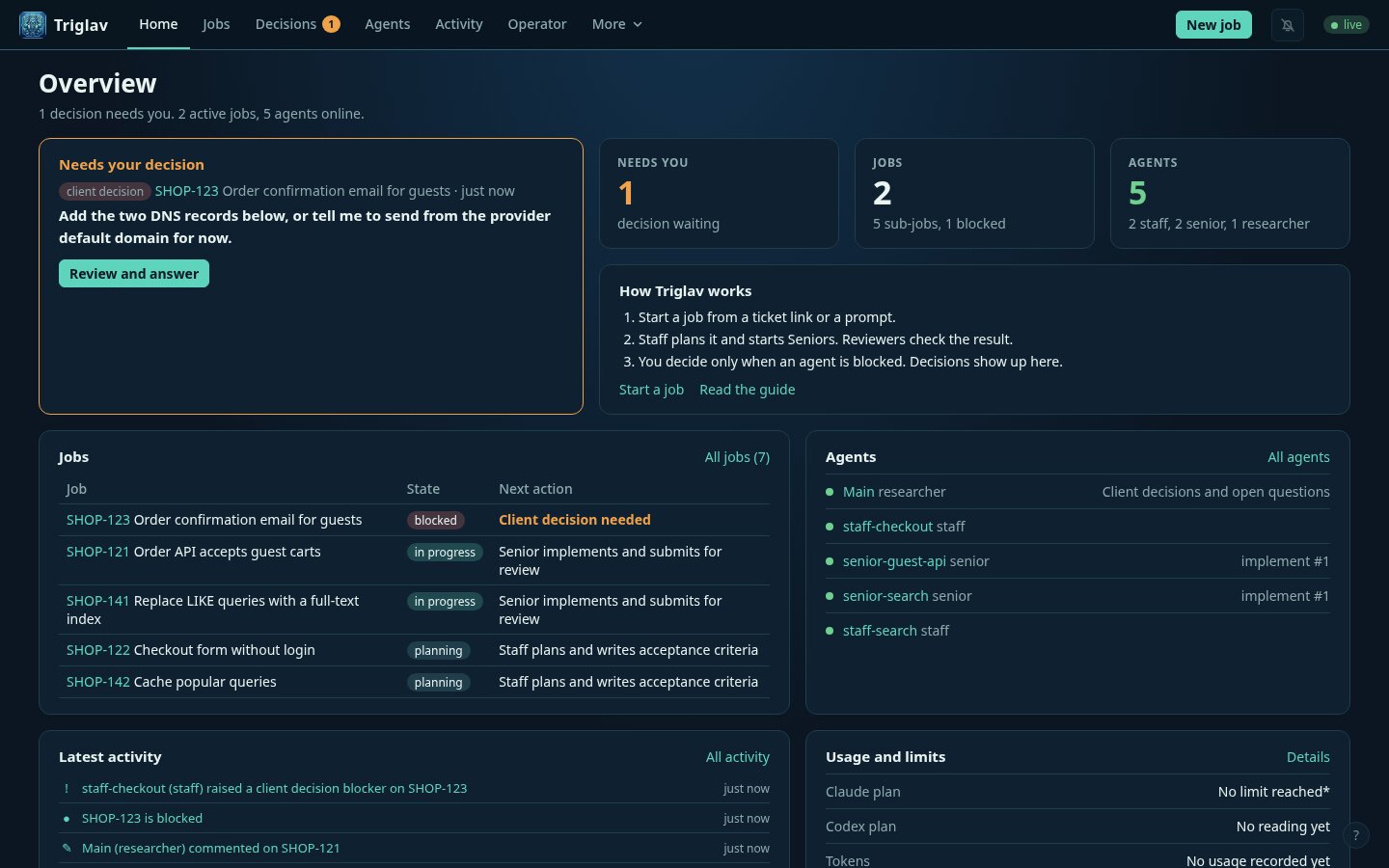
The home page with a demo project. The screenshots in this post use a fictional web shop, not real work.
The roles
The name comes from Triglav, a three-headed Slavic god. The three heads map to the three agent roles.
- Staff is a Claude Code session that owns a job. It reads the ticket, splits it into sub-jobs, writes acceptance criteria, starts the other agents and reviews what they deliver.
- Seniors are Claude Code subagents that Staff starts. Each one takes one sub-job, works in its own git worktree, opens a PR and submits a review package with the validation it actually ran.
- Researchers are short Codex runs. They don’t own any code. They read the message board, answer questions and give their view on open decisions.
There’s a fourth role, and it’s me. In Triglav I’m called the Client. The Client sets the goal and makes the decisions that agents must not make: merging, deploying, force pushing, changing repository settings, and anything that needs a product call.
The roles are not tied to a model. Staff runs on Claude Code today and researchers on Codex, but any supported CLI can take any role. The model and effort for each role is a setting on the dashboard.
Everything goes through MCP
The orchestrator is a Node and TypeScript service with a MySQL database, running in Docker on my
machine. Agents talk to it through MCP tools: register_agent, register_job, ask_question,
raise_blocker, submit_review_package, wait_for_events and about thirty others. The agents still
do all the coding on my machine, outside the containers.
Every action goes through a tool call, so every action is recorded. The dashboard is just a view over that record, so I can see who is working on what, what they asked, and what they decided.
The agents learn the rules from a guide that the orchestrator serves. Each role gets its own card: the common rules, how to wait, and the parts that only apply to that role. Seniors, for example, are told that they can disagree with a Staff decision if they have context Staff is missing, as long as they give evidence. The guide gives the reason: a Senior is closest to the code, so it may know something Staff does not. Disagreeing without arguments is not allowed, and Staff has the final word.
Questions have a deadline
A Senior who is unsure doesn’t just ask Staff. It opens a timed question on the job’s board, with a response window. Researchers and Staff can reply during the window, and the Senior waits for the whole window before it acts, even if Staff replies in the first ten seconds. If nobody replies before the deadline, the window extends, so a question never closes on silence.
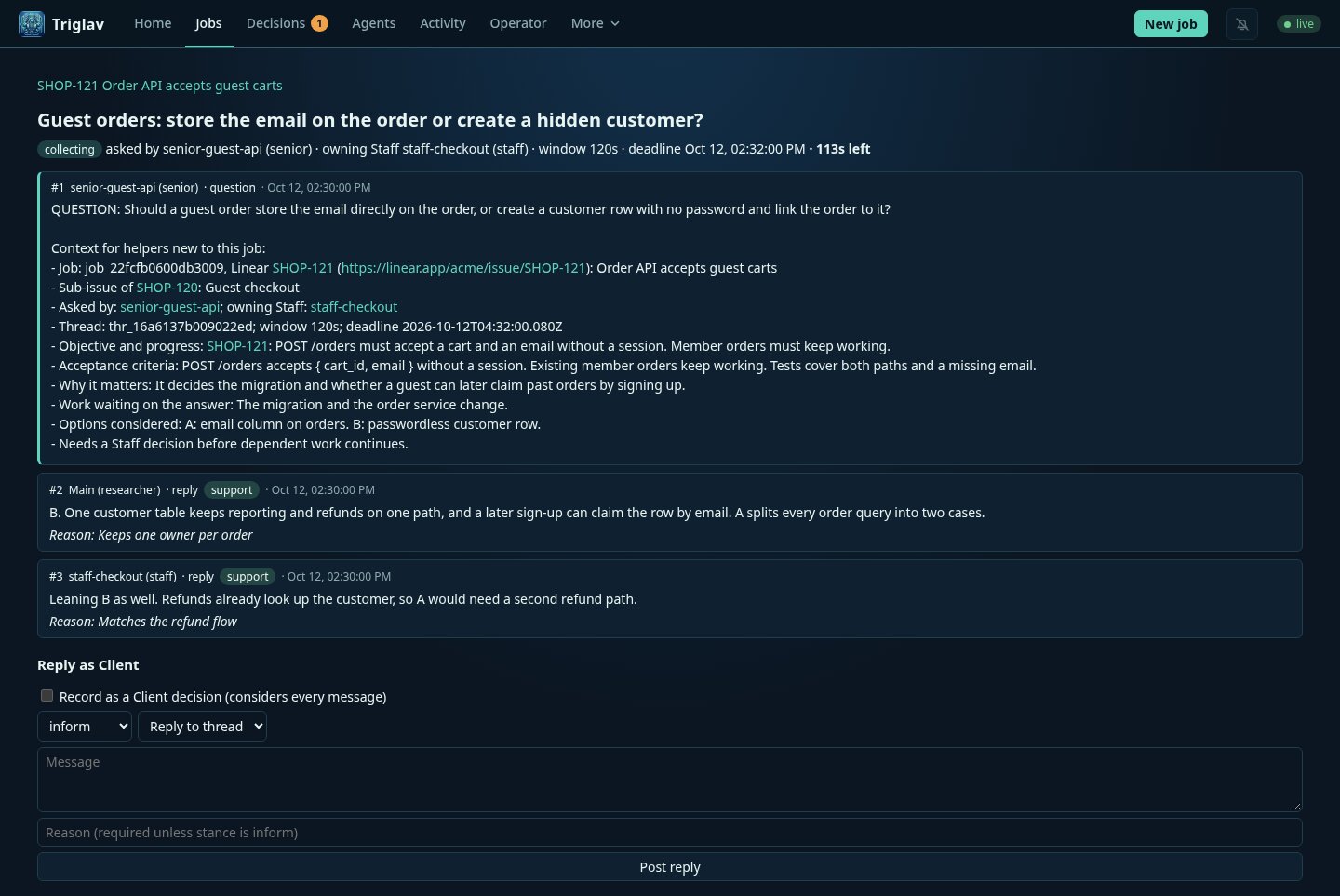
Each question has to carry its own context: the job, the acceptance criteria, what work is waiting and which options were already considered. A researcher that has never seen the job can still give a useful answer. Replies take a stance, such as support or challenge, and anything other than a plain comment needs a reason.
When the window closes, the owning Staff records a binding decision and lists every reply it considered. A reply that came in after the deadline is still kept, but it is marked as late.
The Client decision queue
Most questions never reach me. Staff resolves ordinary engineering questions on its own. A job only
blocks on me when it raises a client_decision blocker, and then it has to explain the problem, ask
the question, give a recommendation and say what unblocks it.
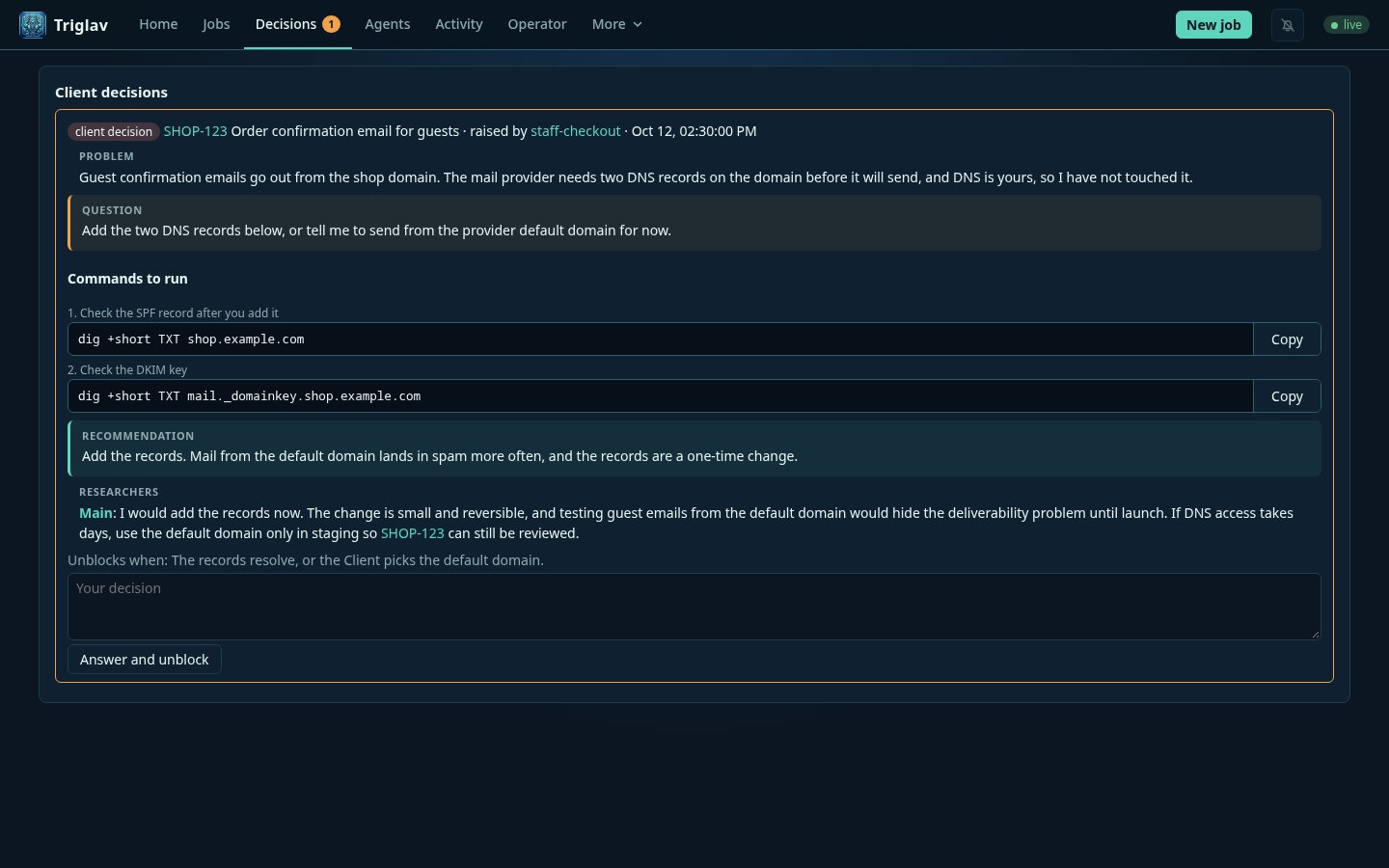
Two details in this view were added after the first version. Commands are in their own boxes with a Copy button. Researchers add their own short advice under the recommendation, so I get a second opinion before I answer.
When I answer, Staff wakes up and continues. The number of open decisions is in the browser tab title, so I can work on something else and still see when the agents need me.
Starting a job
At first a job started the way the brief described it. I opened a terminal and typed something like “read the guide and start working on ticket X as Staff”. Now there’s a New job form. It takes a ticket link, or just a prompt.
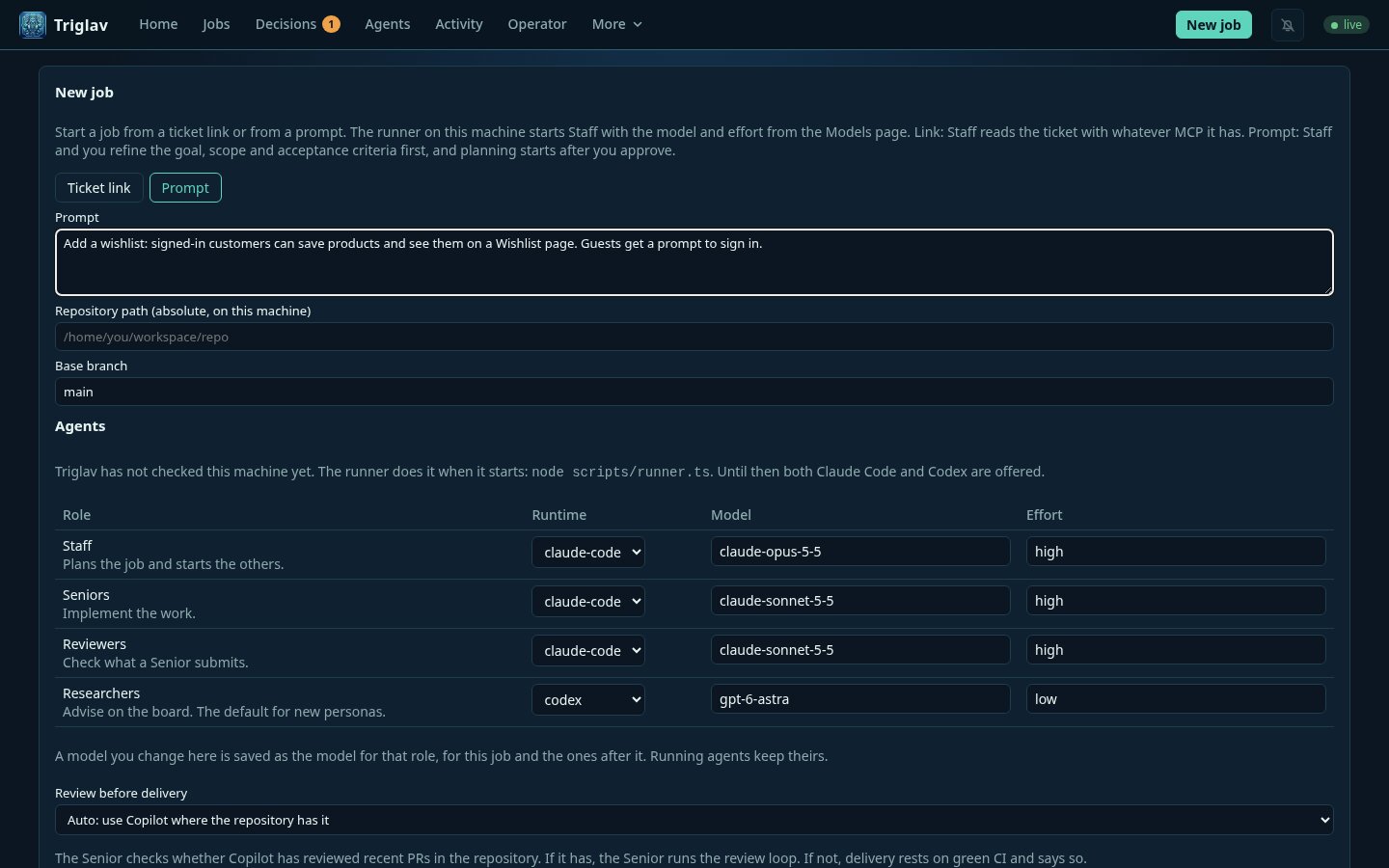
A prompt starts the job in a refining phase. Staff turns the prompt into a goal, a scope, non-goals and acceptance criteria, and asks me questions until nothing is ambiguous. Planning only starts after I approve the criteria.
This form broke one of my original rules. The first design said the orchestrator never starts an agent, because it runs in Docker and has no business starting processes on my machine. To start Staff from a web form, something on the host has to do it. So there’s now a small host runner that polls the server for launches. It builds every command itself from a fixed template and validates every field. It never runs a command string it got from the server. I’ll cover that boundary in a later part.
Where the tokens actually go
It’s easy to assume that agents waste tokens by writing too much. I measured it from the agents’ own transcripts. Across six days of use, all agents together produced about 3.6 million output tokens and read about 3.6 billion tokens from the prompt cache. That’s roughly a thousand to one.
The reason is how agents wait. An agent waiting for events calls a tool that blocks until something happens. Every time that call returns, the model takes a turn, and a turn re-reads the agent’s whole context from the cache. For a Staff that’s often 300k to 700k tokens. A cache read is cheap per token, but a Staff that wakes up every few minutes to find nothing new adds up quickly.
So most of the cost work in Triglav is about turns, not text:
- Staff wakes only for events that need it, like a review package or a Client answer. Everything else is collected and delivered with the next real wake-up.
- Staff waits up to 3000 seconds per call, because its prompt cache lives for an hour. Seniors write their cache with a five-minute lifetime, so they wait 240 seconds.
- Staff compacts its context at about 280k tokens. The Claude Code default for Opus was about 980k, so a long-running Staff never compacted and re-read an ever-growing context.
- Researchers used to wait on the board like everyone else. Now they don’t wait at all. A researcher runs when there’s something for it, answers, marks what it read and exits.
The dashboard has a usage page that reads the same transcripts, per model and per agent, and shows how much of the plan’s five-hour and weekly windows is used, where the CLI reports it.
Six days in
I started Triglav on 7 October with a written brief and a plan, before any code. In the six days since, it has run 29 jobs from real work tickets and from Triglav itself, and 14 of them are done. 56 agents registered: 7 Staff, 38 Seniors, 10 researchers and one reviewer.
Some of that work was Triglav working on itself. The job that prepared the repository for a public release was planned by a Staff, implemented by Seniors on draft PRs, and audited by an agent that listed every hard-coded path and security gap it could find. The PRs are still drafts while I review them.
Not everything worked the first time. Once a Staff stopped at a usage limit. After the limit reset, Claude Code continued the session by itself under a new session id. I resumed it as well and ended up with two Staff agents working on the same job. The runner now checks for a running session of the same conversation before it resumes one.
The repository is private while I finish it. I plan to make it public, source-available under the Business Source License 1.1.
The next part is about waiting: how a tool call can block for 50 minutes without timing out, and why a response window is better than replying as fast as possible.